
GC-07

As a Linux user, I’m not exactly the best example for my !IT friends. If you can’t think of what !IT might be, it’s probably because you are one, a TI (Tech Illiterate). Which sounds rough, but it comes with love. I’m not the best example because I’m not a product user; I’m a technology user, and what the average user actually needs is a product, with its limits, its colors, and its little stars. On top of that, the concept of Linux as an OS is already fuzzy for any TI, and for anyone trying to install Linux for the first time, not knowing where to go buy it or what brand it is is usually enough to never even try.
NixOS
The market share of the Linux possibilities space I trade in is, honestly, pretty small. That comes with the good and the bad of any market that hasn’t gone mainstream and probably never will. Today I’ll tell you a bit about both, but first let me sell you on NixOS.
NixOS is the Linux distro I’ve been running for about 3 years, after spending 9 years on Arch. When I started with NixOS, AI wasn’t really a thing, or at least not as powerful as it is now. Setting it up was tedious, but my goal was clear: manage the unnecessary amount of computers I own from a single place. Today, thankfully, there are only three: desktop, notebook, and server. I started with my desktop, moved on to the notebook, but the idea of NixOS on a server seemed weird to me, I’d never heard of it. After discovering that Michael Stapelberg even considered NixOS for his server, I ended up installing it on mine too.

Unlike other Linux distributions, NixOS isn’t configured through files scattered all over the system (/etc, /usr); it’s configured in .nix files. For example: to change the state of your Debian or Windows box, you’d run something like sudo apt-get install python or click through Next;Next;Next. That creates behind the scenes a bunch of files and configs in places you never cared about, modifies environment variables you didn’t know existed, among other things you were blissfully unaware of and don’t care about until something breaks. When you uninstall that program, pray it leaves your system roughly how it found it. NixOS is different. Instead of doing that imperatively with a command, you edit a .nix file. In this file, you declare the package you want to install and why not its configuration, and after a sudo nixos-rebuild switch, your program is installed. Nix reads that declaration, builds the new system deterministically and activates it atomically. Atomically? Yes, “A-to-mi-cal-ly”, it’s a fancy way of saying the change either applies completely, or doesn’t apply at all. No in-between. That .nix file is, literally, the source of truth of your operating system, the state of your operating system. Your whole system in two folders /boot and /nix, the rest can be recreated. The big quirk (and for many, the dealbreaker) is that to uphold these guarantees, NixOS uses a peculiar file layout: the Nix Store (/nix/store). Instead of installing programs in the traditional paths (/usr/bin/, /bin/, or C:\Program Files), Nix stores each program (or more precisely, each output of a derivation) in a folder with a unique hash that represents its exact contents (e.g. realpath $(which nvim) -> /nix/store/n1bm101nhgw33fv114ibkv10xvh8fgp1-neovim-0.11.7/bin/nvim). This hash isn’t always the same; like most hashes, it’s used to denote uniqueness, individuality. If anything changes even slightly, the hash changes and a new folder is generated. These hashes aren’t isolated either; they form a sort of Acyclic Merkle Tree or DAG. There are very interesting technical differences but that’s for another video.

Acyclic Merkle Tree, nothing too wild to understand:
- Leaves are data hashes -> A hash being a unique identifier generated from a series of data.
- Each internal node is the hash of its children -> A node’s hash is determined by the nodes related to it.
- Changing any leaf changes all the hashes above it, all the way up to the root -> Consequence of 1 and 2.
You can already imagine how this maps onto the Nix Store:
- Each “program” in the store is a node with its hash.
- That program’s dependencies are references, or edges (arrows, for the uninitiated), to other nodes (programs).
- A program’s hash includes the hashes of its dependencies, so changing any dependency changes the entire program, as in life itself.
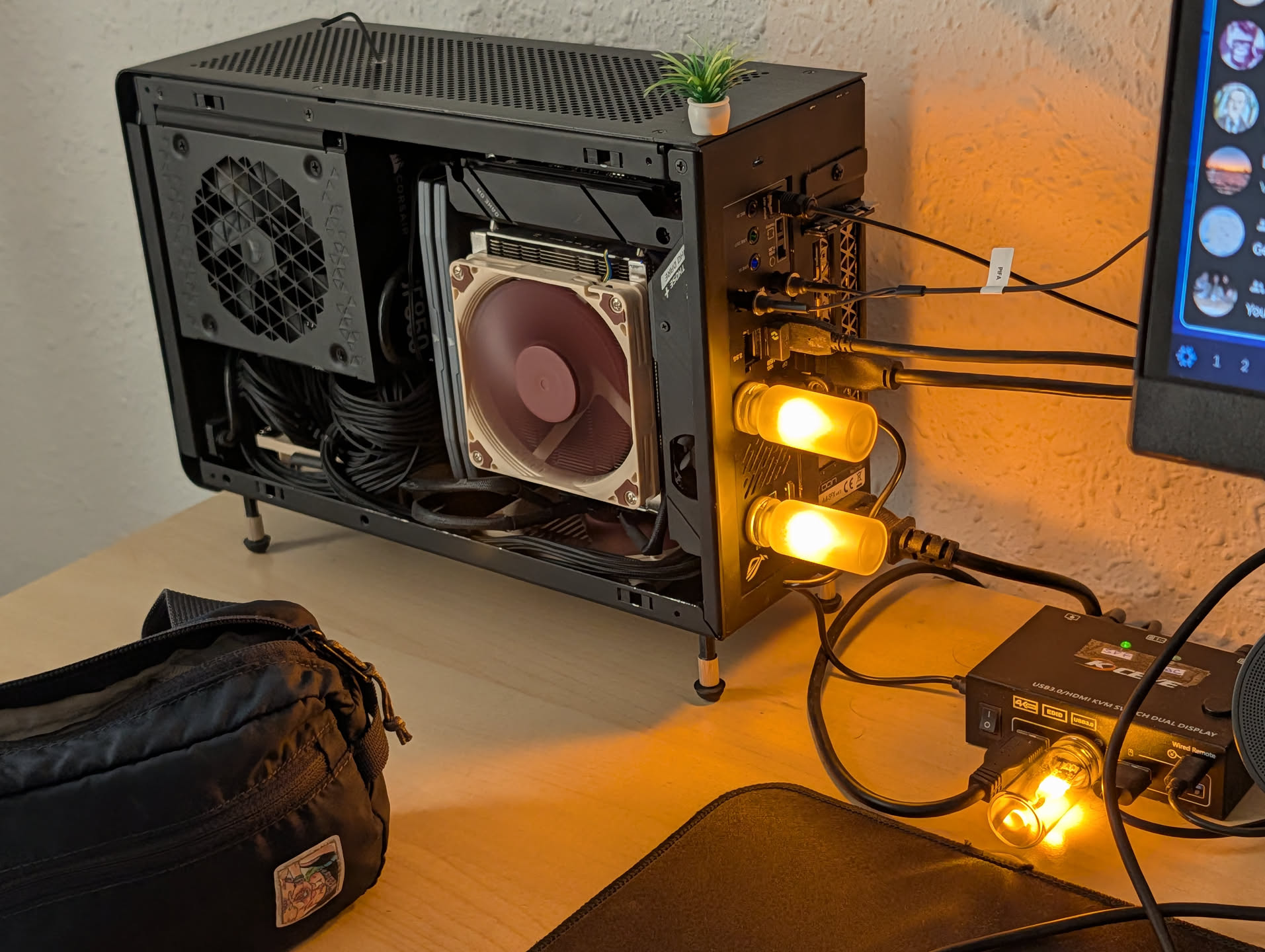
The moment I learned this, I obviously wanted to visualize it: nix-store -q --graph $(which openssl) | dot -Tpng > graph.png, which gives you something like this (if you don’t have dot: try nix-shell -p graphviz). Be careful doing this with large programs, you could be waiting forever. The beautiful part of this tree is that if two packages share a dependency, only one copy exists in the store. But if two packages depend on different versions of the same program or library, that’s fine too, because they live in separate folders with different hashes, etc. In any other system, you’d have one version of that program (e.g. /usr/lib/libfoo.so), and that’s where virtual envs come from: nvm, virtualenvs, Flatpak, AppImage, LD_LIBRARY_PATH, and all the workarounds you or your OS package manager (apt, apk, pacman, yum, etc.) have to deal with.
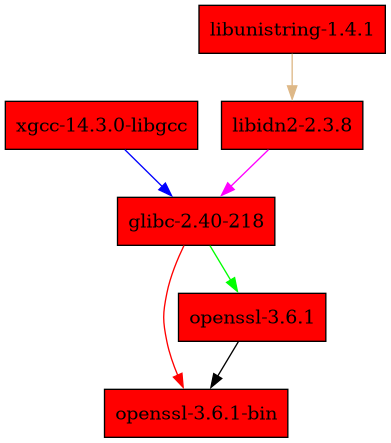
Not everything is rosy in the Nix world, and if there’s one thing that’s certain, it’s that Nix doesn’t come in just one color. This complexity has a cost, and for me it’s one of the biggest trade-offs of NixOS: not being FHS (Filesystem Hierarchy Standard) compliant. This standard defines how the filesystem should be organized in Unix/Linux systems, and the big problem is that most programs that run on Linux logically follow it.
Velocidrone
I’ve been wanting to buy a tiny drone (better known as a Tiny Whoop) to mess around with at home for a while now. Flying these things isn’t easy, so, if you don’t want to crash into the wall on day one of owning your drone, you have to practice with a simulator first. Spoiler: you’ll crash anyway. One that was recommended to me was VelociDrone. The simulator is built in Unity and supports Windows, OSX (Intel, M1, and M2) and Linux (Redhat and Debian), but, much to my dismay, it doesn’t work on NixOS. That wasn’t going to stop me from practicing, so one day, very innocently, I opened a ticket with the “Bat Cave Games” people asking if they could add support. To which they replied:
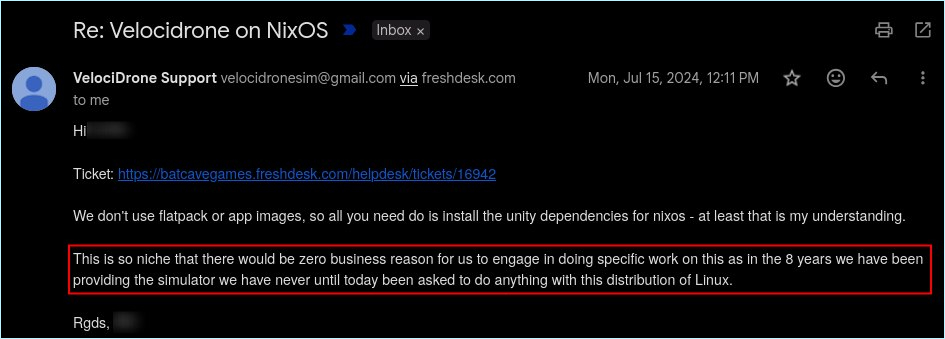
Clearly, they weren’t going to add support. That’s fine, totally fine. But why doesn’t it work? Is it really just a matter of installing Unity’s dependencies on NixOS? How do you even install a program on NixOS?
First things first, you check if your package already exists. You do that at search.nixos.org/packages, and if you’re out of luck, you’ll have to write some Nix yourself. But before that, I’d recommend checking if someone hasn’t already done it for you; for that, unfortunately, GitHub. On GitHub you can search public repositories, and since everything in Nix is declarative there’s a lot you can simply copy and paste. For searching, the keyword and tip you should take home today if you’re a Nix user is: lang:nix. In my case, the query (?q=) was lang:nix velocidrone.
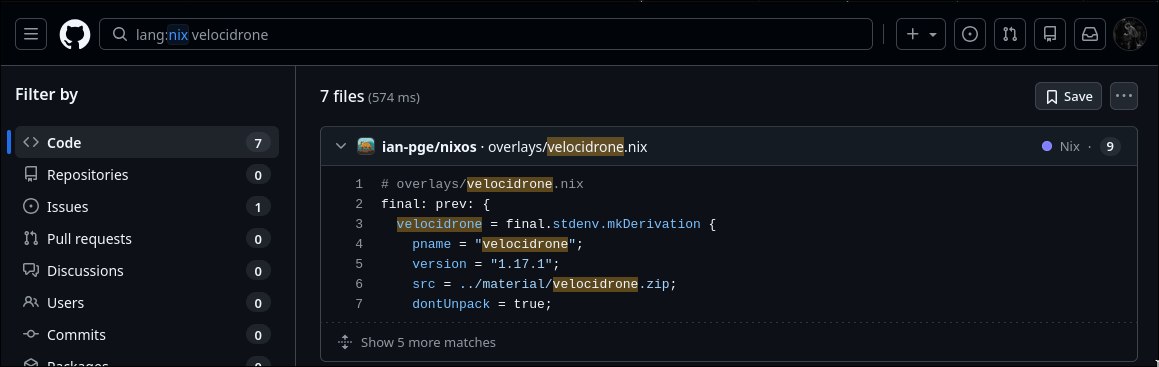
Throwing the query out there, I found at least 7 geeks with public repos. The screenshot above is what I call a GC-07. It means there are at least seven geeks in the same situation as you. A GC-XX can trigger a range of emotions: from unspeakable sadness and desolation if it’s a GC-00, to a simple confirmation you’re on the right track if N > 100. Or it can, like in this case, give you a tiny glimmer of hope that what you want to do, and the way you want to do it, is possible; and that someone out there already tried it.
May the Nerd Know the Nerd Can
What’s left of this post is just technical details of what it took to get VelociDrone installed. It gets a bit more technical from here.
Not completely hopeless, I ended up finding the Ukrainian geek ivankovnatsky, whose velocidrone/default.nix I shamelessly stole and made my own. Let’s break down what Ivan had to do to get VelociDrone running on NixOS.
To install a program in Nix, you have to declare a file whose contents describe how the program should be built, what dependencies it’ll use, where the source code comes from, what compilation/installation steps need to run, and so on. A declared package can look something like this:
{ stdenv, fetchFromGitHub }: # These are your dependencies

stdenv.mkDerivation rec { # This is the node in the dependency tree
  pname = "my-program";
  version = "1.0.0";

  src = fetchFromGitHub { # Using a dependency to fetch the source code
    owner = "user";
    repo = "my-program";
    rev = "v${version}";
    sha256 = "sha256-AAAAAAAAAAAAAAAAAAAAAAAAAAAAAAAAAAAAAAAAAAA=";
  };

  buildInputs = [ ]; # buildInputs declares the dependencies that should be available while building a package. Nix isolates the build in a separate environment

  installPhase = ''
    mkdir -p $out/bin
    cp my-program $out/bin/
  '';
}
Let’s see what our friend Iván did. First, he downloads the .zip from the VelociDrone website:
  src = requireFile {
    name = "production-launcher-debian.zip";
    url = "https://www.velocidrone.com/download/launcher?id=debian&export=download";
    hash = "sha256-pVgQxuPkte5Apx05MuVGdh0MYaJ4Wxx+EhsUe79aiJU=";
  };
Worth noting that Nix is a functional programming language, which can be a bit tricky at first if you’ve been fully sold on the OOP psyops.
This hash is what we’ll need to match with whatever GitHub commit hash we want (it has nothing to do with our Nix hash, all of that goes unnoticed by the user). We can see how he names the package velocidrone-launcher and unzips the result, which is what he stored in src =, the .zip:
 pname = "velocidrone-launcher";
    inherit version src;
    nativeBuildInputs = [ unzip ];
    unpackPhase = ''
      unzip $src
    '';
He installs it, which is basically what I used to do manually before finding this package:
    installPhase = ''
      mkdir -p $out/share/velocidrone
      cp Launcher launcher.dat $out/share/velocidrone/
      chmod +x $out/share/velocidrone/Launcher
    '';
And he declares the desktop shortcut, launcher, etc.:
desktopItem = makeDesktopItem {
    name = "velocidrone";
    desktopName = "VelociDrone";
    comment = "FPV drone racing simulator";
    exec = "velocidrone";
    icon = "velocidrone";
    categories = [
      "Game"
      "Simulation"
    ];
  };
For most programs, that’d be enough. Not for VelociDrone, since it has dynamic dependencies and expects to find them in a standard FHS Linux environment. This could have been avoided with a static build, where, unlike a dynamic build, the dependencies are compiled into the binary itself. In this case, since we don’t have access to the source code, compiling VelociDrone per se isn’t an option, so we download the pre-built binary. That means instead of compilation steps, we’re essentially writing an installer. Think of it as NixOS going all-in on making it easy to write your own installers. That’s how Iván was able to define an FHS environment for VelociDrone’s runtime using buildFHSEnv and declare the libraries Unity needs:
buildFHSEnv {
  pname = "velocidrone";
  inherit version;

  targetPkgs = _: [
    zlib
    libxcb
    # ...
    sqlite
    stdenv.cc.cc.lib
  ];
And then he declares a script to be used as a wrapper before calling the binary, in this case the Launcher:
 runScript = lib.getExe (
    stdenv.mkDerivation {
      name = "velocidrone-wrapper";
      dontUnpack = true;
      installPhase = ''
        mkdir -p $out/bin
        cat > $out/bin/velocidrone-wrapper <<'SCRIPT'
        #!/bin/sh
        dir="$HOME/.velocidrone"
        mkdir -p "$dir"
        cp "${launcher}/share/velocidrone/Launcher" "$dir/Launcher"
        cp "${launcher}/share/velocidrone/launcher.dat" "$dir/launcher.dat"
        chmod u+rwx "$dir/Launcher"
        chmod u+rw "$dir/launcher.dat"
        cd "$dir"
        exec ./Launcher "$@"
        SCRIPT
        chmod +x $out/bin/velocidrone-wrapper
      '';
      meta.mainProgram = "velocidrone-wrapper";
    }
Then he installs a custom icon with extraInstallCommands and declares some metadata with meta=. Once the package is declared, he installs it using a Nix overlay, which looks roughly like this in your config:
final: prev: {
  velocidrone = prev.callPackage ./velocidrone.nix {};
}
An Overlay lets you extend your Nix package set, usually nixpkgs.url = "github:NixOS/nixpkgs/nixos-25.11". From there, you can install velocidrone just like any other pkgs in your configuration. After creating the relevant files and a few tweaks to the installPhase, a nixos-rebuild switch and it was up and running.
#!/bin/sh
export UNITY_DISABLE_PLUGINS=1
export SDL_VIDEO_FULLSCREEN_HEAD=0
export SDL_VIDEO_FULLSCREEN_DISPLAY=0
export SDL_VIDEODRIVER=x11
export QT_QPA_PLATFORM=xcb
dir="$HOME/.velocidrone"
Finding geeks like Iván is hard. NixOS is already a niche within Linux, and on top of that you have to layer in the Wayland niche, and inside that, the Hyprland one. You end up with a Venn diagram where you’re standing in the intersection of your own obsessions, alongside a handful of other geeks.
Thanks, ivankovnatsky.
Note on Translation: This post was originally written in highly colloquial Argentine Spanish, known for its unique slang, cultural nuances, and rhythm. It has been translated into English heavily using AI, so some of the original tone and cultural nuances may have been lost in translation.